Categories
Uncategorized

Band Conditions and HAM Clock

When I sit down at the radio, the first question is usually the same: where is it open right now? Most of the time I just want a quick hint about which band to try first, without digging through solar numbers, SFI, A and K indices or MUF charts.

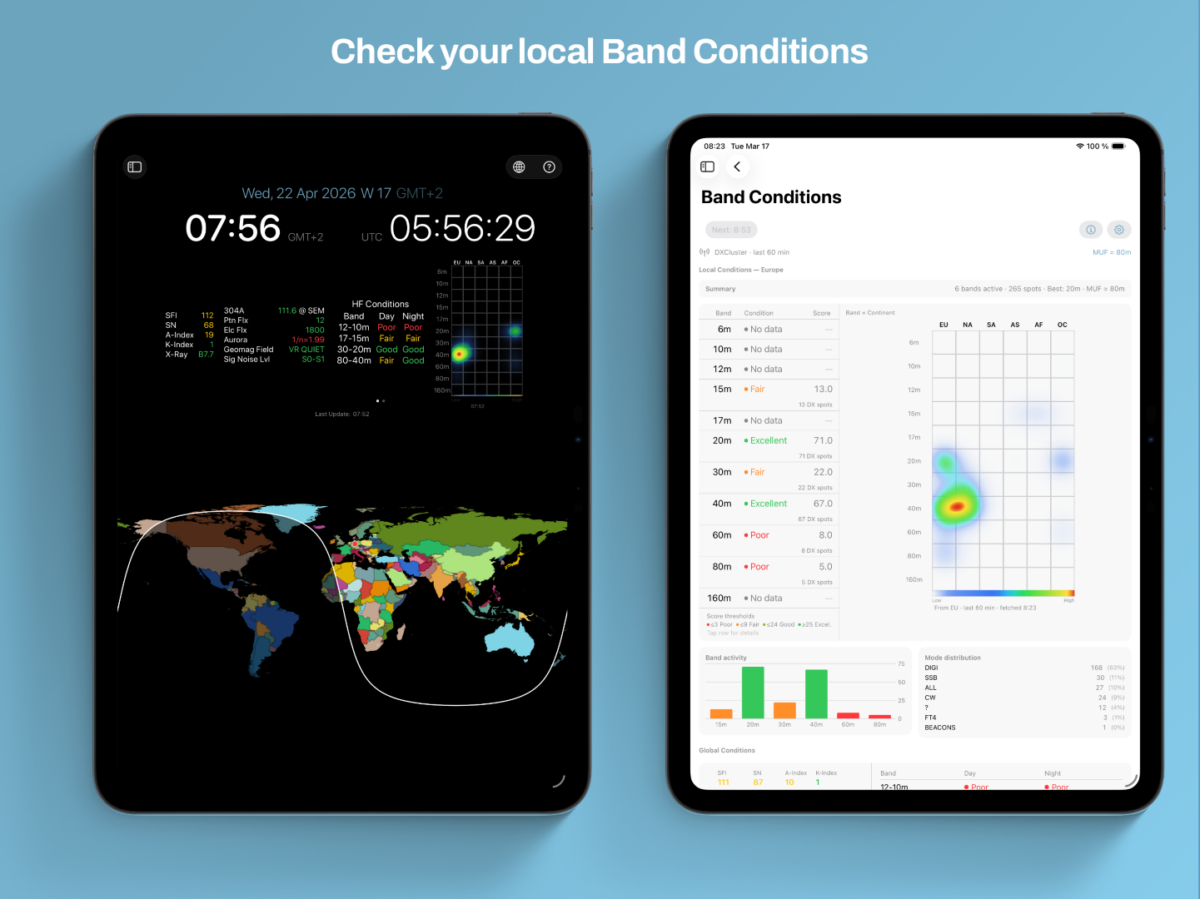
That is the reason behind the new Band Conditions tool in HAM-Toolbox. It is built on the live DXCluster feed that HAM-Toolbox already uses, and it focuses on one thing: a clear picture of what is actually being worked from your location right now.

A view built around your location

Global propagation numbers describe the ionosphere in general. The new view describes your station based on real QSOs other operators are making in the last hour. Each band gets a simple rating from poor to excellent, so one look is usually enough to decide whether it is worth a call or whether another band is the better bet.

A heatmap that shows the openings

Next to the ratings sits a Band × Continent Heatmap — blue for quiet, red and yellow for lively. It is a small addition, but in practice it has become the part I check first: one glance tells you whether Europe is busy on 20 m, whether an opening to North America has started, or whether things are simply quiet for now.

Right inside the HAM-Clock

Rather than only adding a separate tool, I put this where I naturally look anyway: the HAM-Clock. Swipe once for Global Conditions, the familiar worldwide overview. Swipe again for the new Local Conditions view with your personal ratings and the heatmap. Two views, one gesture.

It is the tool I wish I had had earlier, and I hope it makes it a little easier to find those unexpected QSOs on bands you might otherwise have skipped.

Available now on iPhone, iPad and Mac. Open the HAM-Clock, swipe to Local Conditions, and let me know how it behaves at your station.

73,
Jan Roskosch

Categories
Uncategorized

QSL-Card Designer and Print Tool

Paper QSL cards are one of the things that make this hobby special. There is a real difference between receiving a confirmation in an online logbook and pulling a beautifully designed card out of the mailbox.

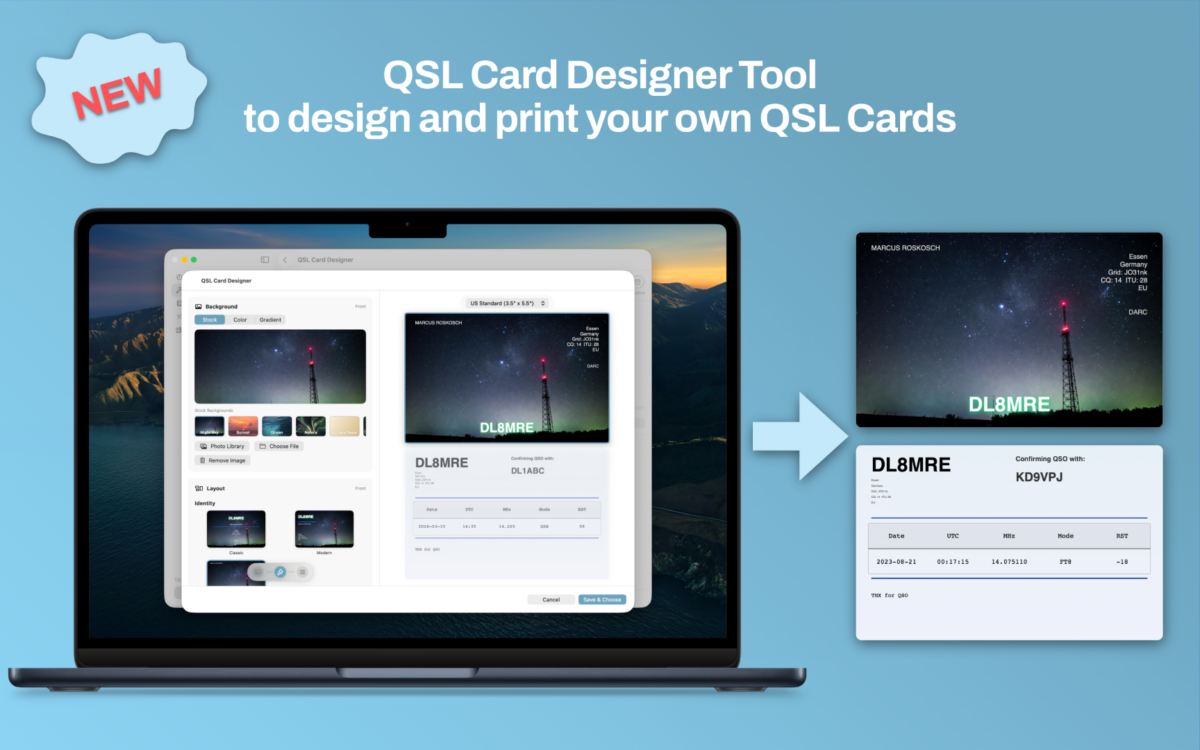
The trouble is that designing, filling in and printing those cards has always been more work than it should be. Generic design tools do not understand QSOs, and logbook apps rarely understand design. With version 1.9 of HAM-Toolbox, I wanted to close that gap with a tool that takes you all the way from an empty card to a printed batch — without ever leaving the app.

Say hello to the new QSL Card Designer and Print Tool.

A guided workflow from card to mailbox

The designer is built around a simple four-step wizard:

  1. Card — pick one of your saved designs or create a new one from scratch.
  2. QSOs — choose which contacts from your logbook the card should confirm.
  3. Print — export or print your cards in the format you need.
  4. Archive — keep a clean record of everything you have already sent out.

Each step takes care of one specific job, so you always know where you are in the process and what is left to do.

A real design tool, built for QSLs

The editor lets you change templates, backgrounds, colors and station info with live feedback on a proper card preview, front and back. Your station details are automatically pulled in from your HAM-Toolbox settings, so a new card is never truly blank — it already knows who you are.

Designs are stored in iCloud, so the card you create on the Mac is immediately available on your iPad and iPhone, and vice versa. You can keep a whole gallery of cards for different activations, contests or special events and switch between them per batch.

Straight from the logbook

QSL printing only makes sense if it is tightly connected to your log. That is why the designer is deeply integrated into the HAM-Toolbox logbook.

Select one or several QSOs, open the context menu, and send them directly to the QSL Card Designer. Your contacts are pre-selected, the station info is filled in, and you are ready to pick a card design and print. No copy-pasting, no exporting, no fiddling with CSV files.

Batch printing and a proper archive

For bureau shipments and events, being able to print efficiently is just as important as the design itself. The tool supports batch exports in common paper layouts, so you can confirm a whole stack of QSOs in one go and print on the stationery you already use.

Once a batch is done, it goes into the Archive. You can always look back and see which cards went out, to whom, and when — a small but important detail that keeps your QSL workflow honest.

Coming next: QSL by email

Paper cards are wonderful, but not every QSO partner is set up for bureau or direct mail. That is why the next step for the QSL Card Designer is a direct email integration: send your finished card straight to your QSO partner as an email, right from the app. Combined with the existing QRZ.com call lookup, HAM-Toolbox will pick up your partner’s email address automatically whenever it is published on their QRZ page — so confirming a contact can be as quick as designing the card and hitting send. Stay tuned for this update!

Why this matters to me

QSL cards are a piece of ham radio culture I genuinely care about. With this release, I hope HAM-Toolbox becomes a place where that culture is actively encouraged: design your own cards, send them out for your QSOs, and keep a proper record along the way.

The QSL Card Designer and Print Tool is available now as part of HAM-Toolbox 1.9, together with new logbook QSL printing options and a number of DX Cluster fixes.

I cannot wait to see the cards you create.

73,
Jan Roskosch

Categories
Uncategorized

New IC-7300 mk2 Now Supported in SDR-Control

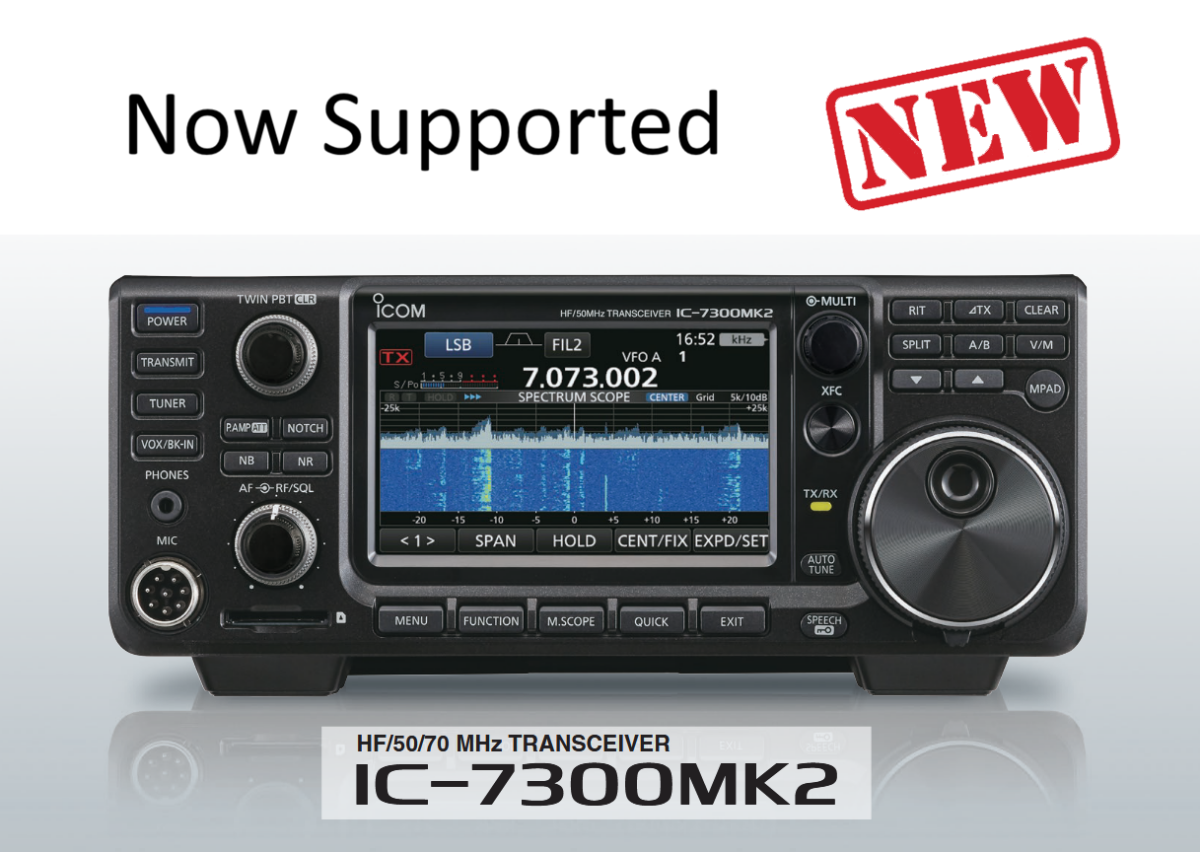
I am excited to announce that with the latest updates to all three SDR-Control apps for iPhone, iPad, and macOS, support for the brand new Icom IC-7300 mk2 has officially arrived!

As the successor to the highly popular IC-7300, the new IC-7300 mk2 introduces a major technical improvement: a built-in LAN port. While the previous model relied on a comparatively slow USB connection, the LAN interface enables significantly faster and more stable remote operation within the local network.

Even more importantly, the IC-7300 mk2 can now be accessed remotely over the internet using SDR-Control, without requiring any additional hardware or third-party software. This makes remote operation easier and more accessible than ever before.

Adding support for the IC-7300 mk2 marks a great achievement at the end of 2025.

When I first saw this new radio in August at the HAM Fair in Tokyo, I immediately knew it would be a game changer—and I was hoping to get my hands on it soon to support it in our apps. I’m happy to say that it happened sooner than anticipated.

A Look Back at an Incredible Year

This update also gives myself and Jan the opportunity to say thank you for a fantastic year 2025! We truly appreciate your support and patience—especially while waiting for requested features.

In total, there were 54 updates alone for SDR-Control this year.

Besides many smaller improvements and bug fixes, the most time-consuming updates included:

  • Preparing the apps for macOS and iOS 26
  • Adding SSTV support
  • Adding APRS support
  • Adding support for the new IC-7760
  • And finally, adding support for the new IC-7300 mk2

And best of all: all of this was provided for free.

Besides SDR-Control for Icom:

The iOS Versions of FT-Control for Yaesu, TS-Control for Kenwood and K4-Control for Elecraft were introduced.

In total there were more than 200 updates this year.

And Jan, my son, developer of HAM-Toolbox has introduced Electronic Toolbox 2, which replaces my long-time App Store #1 app for electronic engineers, students, hobbyists, and HAMs — Electronic Toolbox Pro. He spent almost an entire year developing it, as his goal was not just an update, but a completely new app built from the ground up. I think he did a fantastic job. Well done, Jan — don’t you agree?

Year-End Break & Support Availability

We will now take a deep breath and enjoy a short break until the end of the year.

However, rest assured—if you experience any problems with one of our apps, we are here for you.

If you need assistance, please use the Contact Support feature inside the app to create a support ticket. This helps us respond more efficiently than emails or the website contact form.

Season’s Greetings

We wish you and your families a Merry Christmas and all the best for 2026!

Look forward to many exciting improvements for SDR-Control and our other HAM Radio apps in the coming year.

73s,
Marcus, DL8MRE, and Jan

Categories
Uncategorized

SmartSDR for macOS and iOS Updated to V2.9.50 and V7.0.50

Apple has released my updates for SmartSDR: V2.9.50 for macOS and V7.0.50 for iOS. Here’s what’s new:

Bug Fixes

  • Resolved issues with importing ADIF files containing incorrect characters.
  • Fixed EIBI Data import problems (macOS only).
  • Addressed non-standard or prefix call sign errors in FT8.
  • Corrected AGC settings in the right Radio Panel (iOS only).
  • Fixed logbook title updates when switching logbooks.

New Features

  • Added MIDI commands for reverse frequency tuning.
  • Introduced a MIDI command to toggle Split-Mode.

Additional Updates

These updates also include various behind-the-scenes improvements and optimizations.

These are the first updates of the year, with more planned. Updates for other apps will be released soon.